Accounts Receivable Aging Report: What It Shows
Learn how AR aging reports reveal overdue invoices, cash flow risk, and payment patterns, and when to standardize collections beyond spreadsheets.
Most businesses know they have outstanding invoices. Fewer know exactly how old those invoices are — and that gap is where cash flow problems quietly develop.
An accounts receivable aging report doesn't just tell you who owes money. It tells you how long they've owed it, which is an entirely different kind of information. It's generally accepted that the longer an invoice remains open, the less likely it is that the customer will remit payment. The report makes that risk visible before it becomes a write-off.
This guide covers how aging reports work, what the buckets actually mean operationally, where spreadsheet-based tracking breaks down, and what to fix before you try to automate collections.
What an Accounts Receivable Aging Report Shows
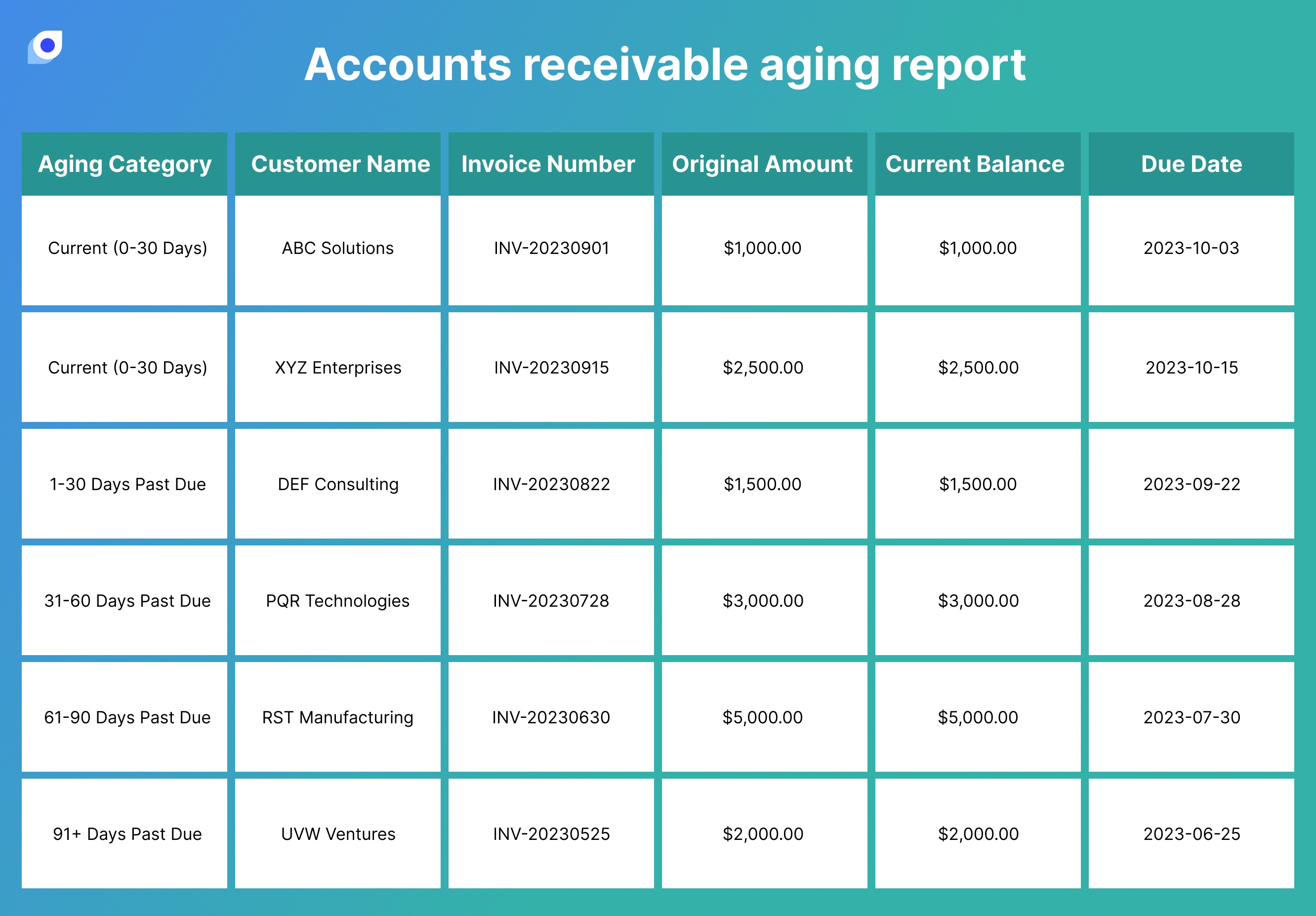 Image: bluecopa
An AR aging report organizes all unpaid customer invoices by how long they've been outstanding. Rather than providing blended metrics like DSO or AR turnover — which are directionally helpful but averaged — aging is a bottom-up approach that gives you customer- and invoice-level detail to act on specifically.
A typical aging report organizes unpaid invoices into time buckets — usually current, 1–30 days past due, 31–60 days past due, 61–90 days past due, and over 90 days past due. Here's what each bucket signals in practice:
Bucket | Status | What It Typically Means |
|---|---|---|
Current | Not yet due | Invoice issued, within payment terms — no action needed |
1–30 days past due | Early overdue | First follow-up territory. Often a timing issue or missed invoice |
31–60 days past due | Attention needed | Send a formal reminder. Flag for weekly review |
61–90 days past due | At risk | Direct outreach required. Reassess credit terms |
90+ days past due | High risk | Escalate immediately. Recovery rates drop sharply at this threshold — these accounts often require specialized intervention |
Healthy businesses typically maintain 70–80% of receivables in the current bucket, 10–15% in the 31–60 day range, and less than 10% combined in the 61–90 and 90+ categories. If your 90+ day bucket exceeds 15% of total receivables, you're facing significant collection challenges.
Accounts Receivable Aging Report Example
An accounts receivable aging report is easiest to understand when you look at it as an invoice-by-invoice schedule. Each unpaid invoice is placed into an aging bucket based on the number of days past due, not simply the invoice date.
| Customer | Invoice | Due date | Current | 1-30 days | 31-60 days | 61-90 days | 90+ days |
|---|---|---|---|---|---|---|---|
| North Retail | INV-1042 | May 30 | $4,200 | - | - | - | - |
| Blue Supply | INV-0988 | April 18 | - | $2,750 | - | - | - |
| Metro Wholesale | INV-0911 | March 21 | - | - | $6,100 | - | - |
| East Dealer | INV-0834 | February 10 | - | - | - | $3,900 | - |
| Legacy Account | INV-0712 | January 5 | - | - | - | - | $8,450 |
This same report may be called an AR aging report, aged receivables report, or aged debtors report. The labels differ by company or region, but the operating question is the same: which invoices are still collectible with normal follow-up, and which balances now require escalation?
For B2B teams, the report should also connect back to the original order, delivery record, invoice, payment terms, and dispute notes. Without that context, the finance team can see that an invoice is overdue but may not know whether the issue is a slow customer, a delivery mismatch, or a missing settlement step.
How to Read Aging Buckets Without Missing Risk
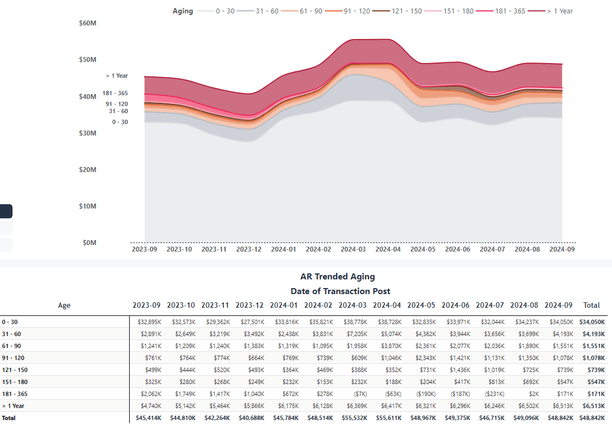 Image: Microsoft Fabric Community
The common mistake is looking at the total outstanding balance and stopping there. A stable total may still include an increasing number of long-overdue invoices — focusing only on total receivables hides serious collection risk.
Here's what to actually look for when you open an aging report:
Watch for bucket migration. Healthy collections show amounts shifting back to "Current," not accumulating in older buckets. Analyze how balances move between buckets month over month. A customer appearing in the 31–60 day bucket two months in a row isn't a timing issue — it's a pattern.
Identify repeat offenders. Customers who consistently appear in overdue categories often signal structural payment issues rather than one-time delays. Treat them differently from first-time late payers.
Use aging to estimate bad debt. Assign increasing uncollectible percentages to each bucket based on historical experience — for example, 1% for current, 4% for 1–30 days, 10% for 31–60 days, 30% for 61–90 days, and 50% for over 90 days. Multiply each bucket total by its percentage to get your estimated bad debt allowance.
Most recoverable B2B payments happen within the first 60 days. After that, recovery rates drop meaningfully. That's why the 31–60 day bucket matters more than most teams give it credit for — it's still recoverable with a single follow-up, but only if you catch it.
Common Mistakes in Spreadsheet-Based AR Tracking
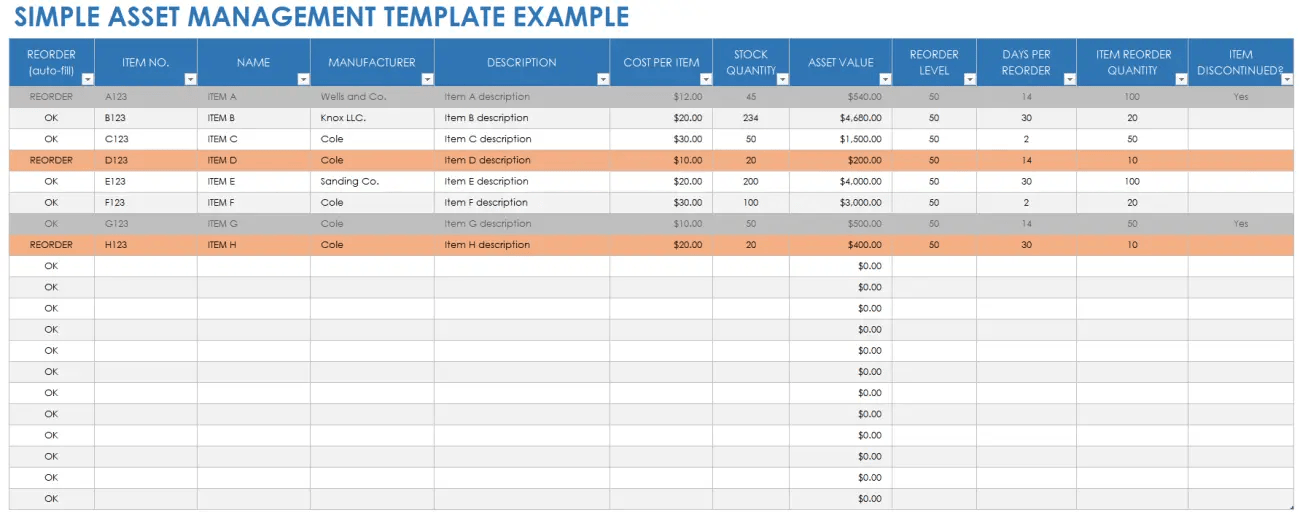 Image: Smartsheet
Spreadsheets can produce an aging report. The problem is what happens between reports.
AR aging reports are only as good as the data that goes into them. Invoices need to be created and entered as soon as they're issued. Customer names and account data need to be standardized. Payments need to be applied to the correct invoices without delay. In a spreadsheet environment, none of these happen automatically.
The practical failure modes:
Stale data between reporting cycles. If you're running an aging report monthly, you have a 30-day blind spot. A customer who crossed into the 60+ day bucket last week won't show up until next month's report.
Misapplied payments. When a payment comes in, someone has to manually match it to the right invoice. Partial payments are worse — they require updating a specific line in a specific file. Errors compound quietly.
No connection to the order that created the invoice. In most spreadsheet setups, the aging report exists separately from the purchase order or delivery record. If there are disputes or documentation mismatches, they show up as collection friction — invoices stay unpaid longer because the underlying transaction data isn't linked.
That last point tends to be invisible until a dispute surfaces. A customer disputes an invoice because the delivered quantity doesn't match what was ordered. Your AR team goes looking for the original PO and finds it in a different file, managed by a different person. Resolution takes a week. Meanwhile the invoice ages.
When Aging Reports Point to a System Problem
A single overdue invoice is a collection problem. A pattern of overdue invoices across multiple customers is a system problem.
A rising number of overdue invoices can signal cash flow shortages in the coming months — and it can also reveal customers who consistently fall into the 60–90+ day categories, which may prompt rethinking credit terms or taking a more aggressive collections approach.
But sometimes the aging report is telling you something different. Not that customers are slow to pay, but that your settlement process has gaps that make it easy for invoices to fall through. Signs of a process problem rather than a customer problem:
New customers age faster than established ones with no change in payment terms
Invoice disputes spike at month-end when reconciliation happens
Your team discovers overdue invoices that were never followed up because no one had visibility
Collections happen reactively — you find out invoices are overdue when you run the monthly report, not before
Beyond collection efforts, AR aging also informs cash flow forecasts, credit approval policies, and estimation of accounting reserves required for bad debt. When it's being used only as a collections checklist and not as a signal for process improvement, you're getting a fraction of its value.
💡 If you're working through the foundational accounting concepts behind receivables — how costs are recognized, when revenue is recorded — the What Is Cost Accounting? covers the framework that connects to AR management.
What to Standardize Before You Automate Collections
Automation applied to a broken process makes mistakes faster. Before introducing any automated follow-up or AR software, get these four things consistent:
① Standardize customer and account naming. The same company appearing as "ABC Corp," "ABC Corporation," and "A.B.C. Corp." in different invoices means your aging report can't aggregate their balance accurately. Clean this up before you try to automate anything against it.
② Define payment terms explicitly in every invoice. Define and communicate terms before onboarding the customer — Net 30, 45, or custom terms — so there's no confusion when you follow up. Verbal agreements don't show up in aging reports. Written terms on every invoice do.
③ Apply payments to invoices immediately, not at month-end. Every day a payment sits unmatched, your aging report overstates overdue balances. Teams that batch-process payments weekly are operating with systematically inaccurate AR data.
④ Link invoices to the orders that generated them. When invoice data and order data live in separate systems, disputes take longer to resolve and invoices age. The fix isn't necessarily a new system — it's ensuring that invoice records reference source documents (PO number, delivery confirmation) that can be pulled up when a customer questions a charge.
Getting these four things right produces an aging report you can actually act on. Without them, automation just sends reminders against data you can't fully trust.
If you need accounts receivable, order records, and settlement status in one connected workflow, see how StackCube supports AR and settlement operations →