What Is a BOM? Bill of Materials Guide
Learn what a bill of materials is, why BOMs matter for manufacturing, and how to create and manage them for production operations.
What Is a BOM (Bill of Materials)?
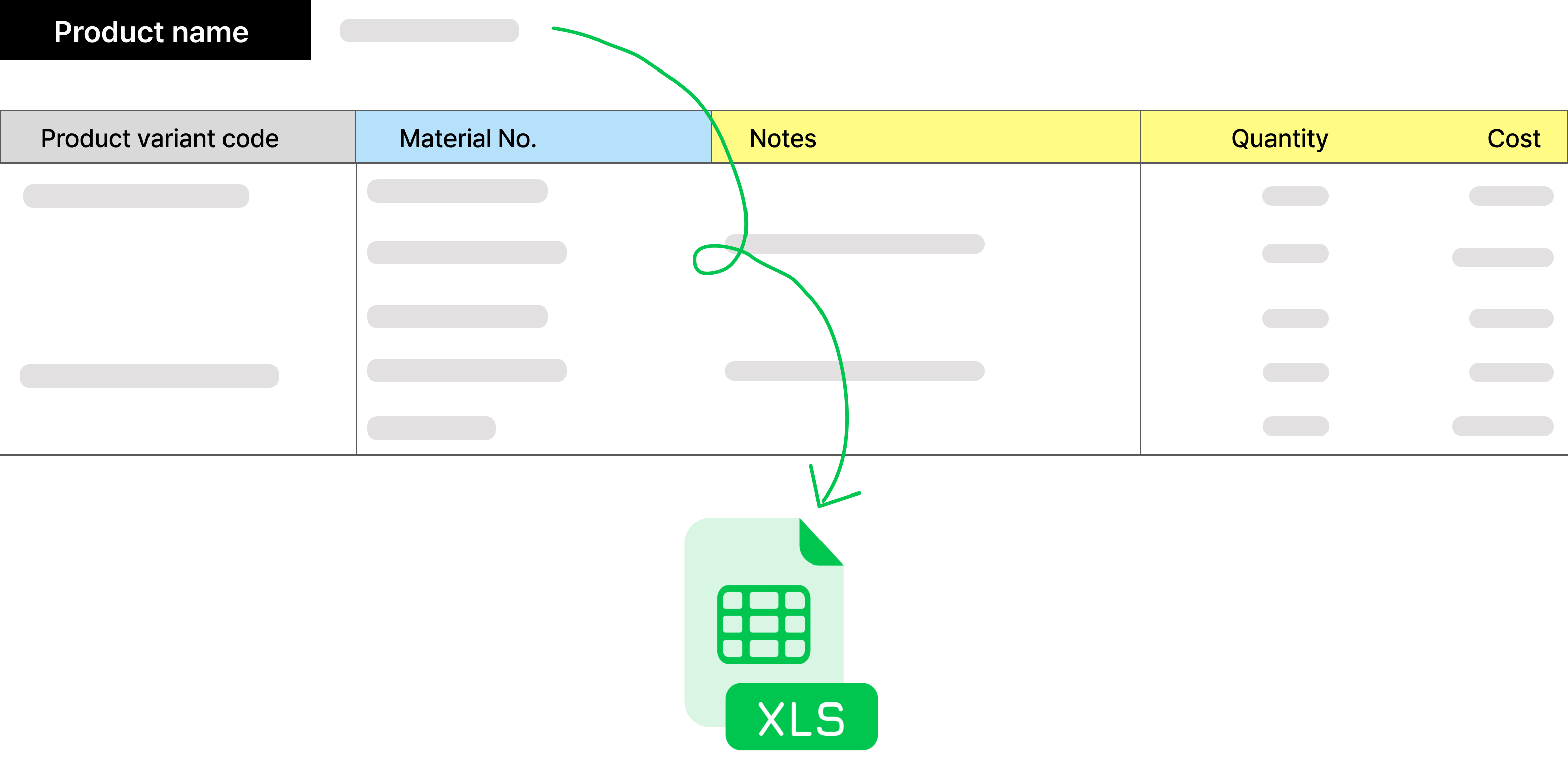 A BOM (Bill of Materials) is a foundational document in manufacturing and production. It's a structured list of every component, part, raw material, and assembly instruction needed to build a product — from the final assembly down to the smallest screw.
For example, manufacturing a car requires a BOM that systematically records the sub-components of the engine, tires, doors, and every other part. The BOM supports every stage from product design through assembly and production management, serving as the single source of truth for what goes into a finished product.
But creating a good BOM is only the beginning. The real challenge is connecting the BOM to the rest of your operations: BOM finalized → required materials identified → purchase orders sent to suppliers → materials received → inventory updated. When these steps live in disconnected spreadsheets and email threads, material shortages and overstocking become recurring problems.
BOM Definition
Beyond listing product components, a BOM includes procurement methods, usage instructions, and specifications for each item. BOMs can be managed in spreadsheets, or in enterprise systems such as ERP or PLM (Product Lifecycle Management) platforms.
One of the most well-known public BOMs is Apple's iPhone BOM, which reveals manufacturing cost breakdowns like the one shown below.
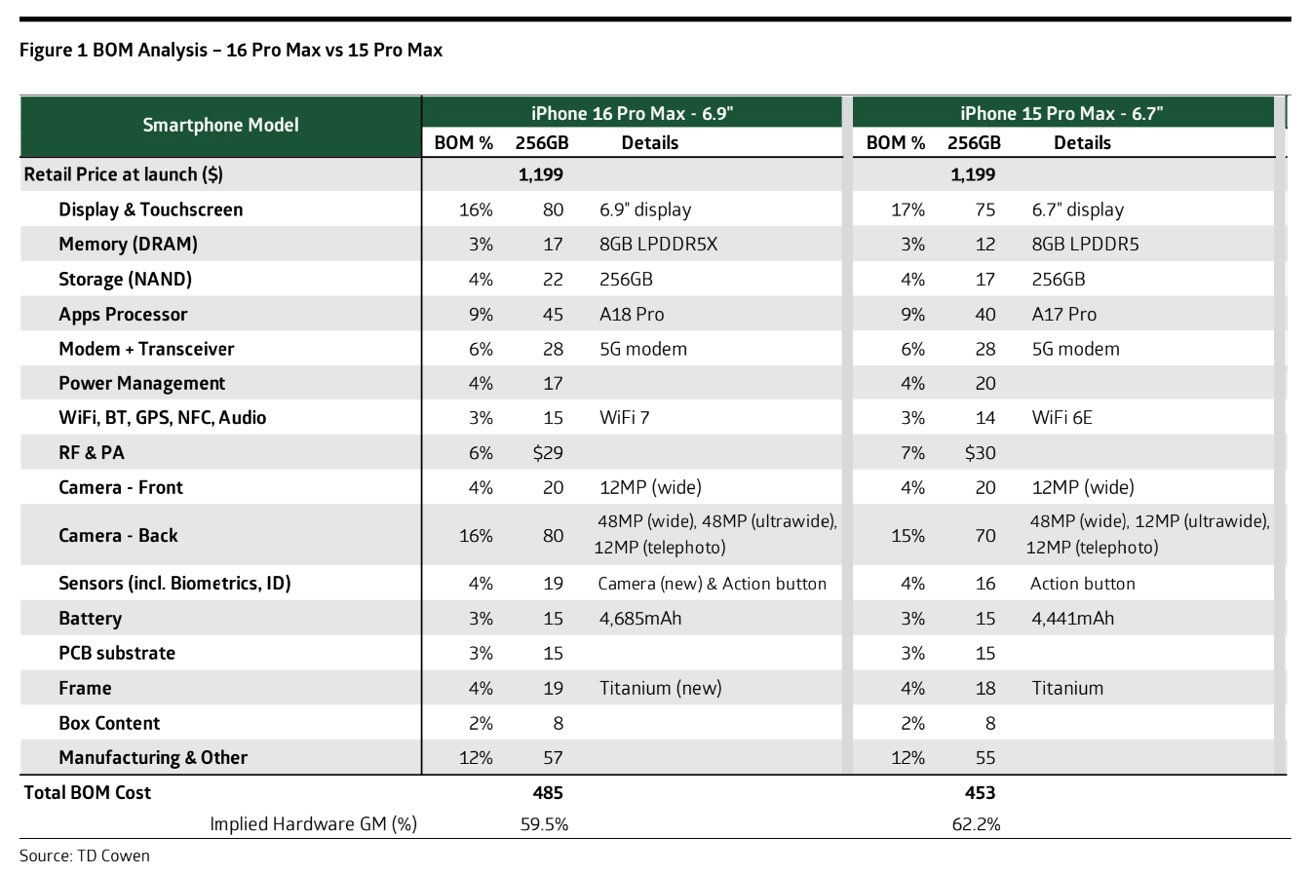 Source: 91mobiles
Why Do You Need a BOM?
A BOM plays a critical role across product design, development, production, and management. It's an essential tool for efficient inventory management and quality control.
With an accurate BOM, production lines can operate smoothly without missing parts. This leads to more organized inventory management, better quality control, and higher customer satisfaction. Because a BOM systematically documents every component of a finished product, it also makes replicating or scaling production significantly easier.
5 Reasons a BOM Is Essential
Efficient Inventory Management
By identifying the types and quantities of materials needed in advance, you can maintain optimal stock levels — preventing overstocking while ensuring materials are available when needed.
Cost Reduction
A BOM helps minimize material waste and optimize resource allocation, enabling systematic control over production costs.
Production Process Optimization
A well-defined BOM with clear assembly sequences simplifies complex production structures and improves workflow efficiency.
Cross-Department Collaboration
Design, production, procurement, and quality teams can all work from the same BOM — sharing identical data to maintain consistency and enable smooth communication.
Product Improvement and Development
Because a BOM records all product information systematically, it serves as a reference for upgrades, design changes, and new feature additions.
BOM Structure and Components
At minimum, a BOM should include the following fields:
Field | Description |
|---|---|
Part Number | Unique identifier for each component |
Description | Component name and details |
Specification | Dimensions, material type, and other specs |
Revision | Version information |
Quantity | Number of units required per assembly |
Unit of Measure | Measurement unit (kg, EA, meters, etc.) |
Additional fields like supplier information and notes can also be included. BOMs can be structured as flat (single-level) or multi-level hierarchies, depending on product complexity.
Bill of Materials Management Process
A bill of materials management process explains how a BOM moves from product definition to day-to-day operations. It is not just a list of parts. It is the control flow that tells teams which version is valid, which components are needed, what is already in stock, and what must be purchased before production can start.
A practical BOM management process usually follows this sequence:
- Define the finished product and subassemblies. Break the product into parent items, subassemblies, raw materials, packaging, and purchased parts.
- Standardize item data. Assign part numbers, units of measure, supplier references, lead times, and cost fields so the same component is not created twice.
- Build and approve the BOM version. Confirm quantities, alternates, scrap assumptions, and effective dates before the BOM is released to purchasing or production.
- Check inventory against the BOM. Compare required quantities with available stock, reserved stock, inbound orders, and expected shortages.
- Turn gaps into purchasing or work orders. Missing components should flow into purchase requests, supplier orders, or production tasks without manual re-entry.
- Review changes after production. If actual usage differs from the BOM, update the BOM or the operating process before the next build.
This is where BOM and inventory management become tightly connected. A BOM tells you what should be needed; inventory data tells you whether those materials are actually available. When the two are disconnected, teams discover shortages late, purchase duplicate parts, or build from an outdated bill of materials.
From BOM to Material Procurement
Many companies think the job is done once the BOM is created. But writing the BOM is just the starting point. After the BOM is finalized, the entire flow — calculating required materials, placing purchase orders with suppliers, receiving goods, and updating inventory — needs to be connected for production management to actually work.
The BOM-to-Procurement Workflow
Step 1: Finalize the BOM
Complete the product structure → lock in the materials list
Step 2: Calculate Material Requirements
Use the BOM to compute material needs → check current inventory → determine shortage quantities
Step 3: Place Purchase Orders
Order shortage materials from suppliers → confirm quantities and delivery dates
Step 4: Receive Materials
Materials arrive → record received quantities
Step 5: Update Inventory
Inventory increases automatically upon receipt
What Goes Wrong When These Steps Are Disconnected
Problem 1: The BOM is in Spreadsheet A, inventory is in Spreadsheet B, and purchase orders go out via email.
→ You calculate material needs from the BOM, but the inventory spreadsheet hasn't been updated.
→ You order materials you already have → overstocking
Problem 2: You email a purchase order to a supplier → they miss it → delivery delayed.
→ Production schedule disrupted
Problem 3: Materials arrive → someone forgets to update the spreadsheet.
→ System shows zero stock even though materials are on the shelf → duplicate order placed
Problem 4: BOM changes → material requirements need recalculation → done manually.
→ Calculation error → material shortage
What Happens When Everything Is Connected?
BOM finalized → material needs auto-calculated → shortage quantities identified → purchase orders can be triggered automatically → receipt recorded → inventory updated in real time
When each step is connected automatically:
BOM changes trigger automatic recalculation of material needs
Shortage quantities are flagged with reorder alerts
Purchase orders are recorded and tracked automatically
Inventory updates instantly upon receipt
Significantly reduces overstocking and material shortages
If you want BOM tracking alongside purchase orders and inventory in one place, see how StackCube connects these workflows for small manufacturers and distributors.
How to Create a BOM
Once you've reviewed the guidelines below and gathered your information, you're ready to build your BOM. The process is straightforward — but gathering accurate data can be the hard part.
Analyze the Product
List the final product and all its components, sub-assemblies, and raw materials.
Organize the Data
For each component, record the part number, name, specifications, and quantity.
Design the Structure
Choose between a flat (single-level) or multi-level hierarchy based on product complexity.
Document Assembly Procedures
Clearly describe the production sequence and methods.
Review and Maintain
Verify accuracy and update the BOM regularly to reflect changes.
Key Considerations Before Creating a BOM
1. Define what you're building first
Clearly identify the product and all required parts and raw materials. Gathering thorough information during the design phase reduces unnecessary revisions later.
2. Plan your BOM management approach
Without a management plan, the BOM gets edited by too many people and version control breaks down. Decide who owns the document and limit editing access.
3. Consider all stakeholders
Design, manufacturing, and procurement teams all use the BOM. Write it clearly and intuitively so every department can work from it effectively.
4. Decide what information to include
Even before filling in the details, determine which categories and fields your BOM needs to cover.
5. Choose the right tools
Spreadsheets work for early-stage projects, but as complexity grows, consider ERP, PLM, or other dedicated tools.
Limitations of BOM Management
 Managing BOMs comes with inherent challenges:
Error-prone data entry: Manually created BOMs are susceptible to incorrect data entry and missed updates.
Difficult change management: Frequent product changes make manual BOM maintenance time-consuming and labor-intensive.
Multi-level complexity: Managing complex multi-level BOMs in spreadsheets is inefficient and increases the risk of accidental data corruption.
Disconnected procurement: When the BOM exists separately from your procurement process, material shortages and overstocking become recurring problems.
Better Ways to Manage Your BOM
Given these limitations, using a dedicated system is far more effective than spreadsheet-based management.
BOM Solution Examples
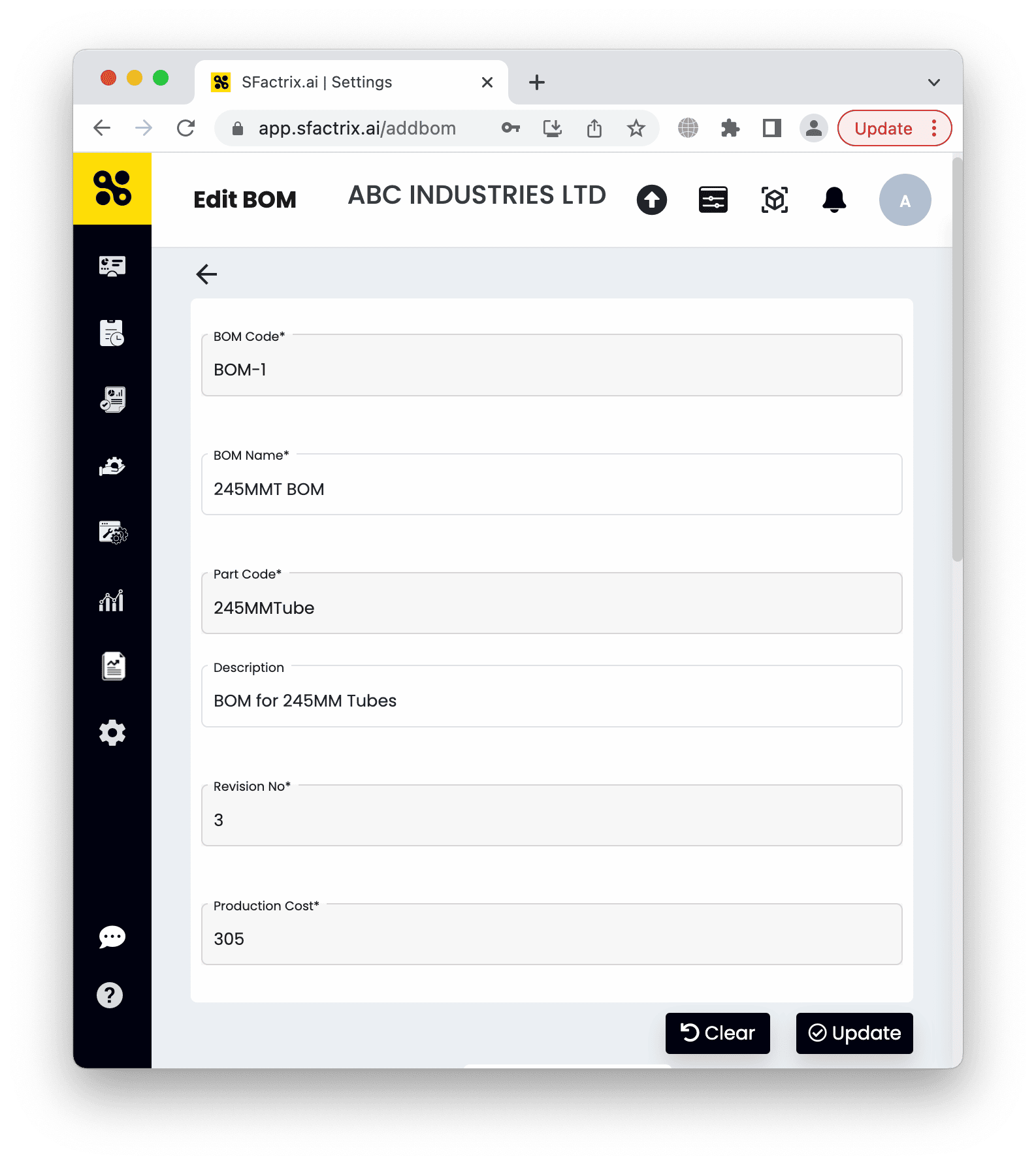 Source: Fogwing
Dedicated BOM management tools like ERP, PLM, or modular or low-code platforms offer clear advantages over spreadsheets:
Automated updates: Changes are reflected in real time, keeping data accurate.
Centralized data: All departments work from the same source of truth.
Template support: Industry-specific templates let you create and manage BOMs quickly, or customize them to match your company's exact structure.
Procurement integration: Automatically calculate required materials from the BOM and connect directly to supplier purchase orders.
StackCube: BOM + Inventory Workflow Template
StackCube's template brings efficiency and automation to BOM management that spreadsheets can't match.
Instead of just recording material quantities in Excel, StackCube automatically calculates material requirements based on BOM versions and derives producible quantities from current stock levels.
You can freely add tertiary and quaternary sub-components, making it useful for complex manufacturing processes and products with many parts. It's equally well-suited for distribution businesses where product configurations change frequently.
StackCube Template Advantages
Auto-calculates material needs based on BOM and current stock
Manages complex multi-level BOMs with ease
Quickly register component changes when versions update
Bulk upload and download via Excel (.csv)
Browser-based — accessible from anywhere
Built-in automation: alerts, auto-reorder, and more
BOM → material procurement → inventory update — all connected
A BOM is an essential tool for production and materials management. With systematic creation and maintenance, it enables cost reduction and process optimization. However, handling complex product structures and frequent data changes effectively requires the right system.
Especially for manufacturing and distribution businesses: a good BOM alone isn't enough. You need the full flow — BOM → material requirements → supplier orders → receiving → inventory — connected end-to-end for production management to truly work.
💡 Ready to manage your BOM without spreadsheets?
👉 See the BOM management template guide →
Related Guides
This guide is part of our comprehensive operations management series. Explore the full guide or dive into a specific area below.
👉 📚 Inventory, ERP & Operations: Complete Guide